

Many website owners focus solely on creating great content but overlook the technical aspects that help search engines find and understand their pages.
Without proper technical SEO, even the most brilliant content can remain hidden from search results, leading to lost opportunities, reduced traffic, and diminished online visibility. It's like having a fantastic shop in an unmarked building down a dark alley.
This comprehensive guide will walk you through every aspect of technical SEO, from basic concepts to advanced techniques, to help you build a solid foundation for your website's search performance.
Key Takeaways
- Technical SEO ensures your website is crawlable, indexable, and optimised for search engines to improve rankings and visibility.
- Technical SEO impacts search rankings and indexing and crawlability, improves site speed, enhances user experience (UX), and optimises mobile experience.
- A solid technical SEO foundation ensures your on-page and off-page efforts succeed by making your site search-engine friendly.
- Crawling helps search engines discover your pages, while indexing organises and stores them for retrieval in search results.
- Key elements include site architecture, mobile responsiveness, page speed, SSL certificates, and structured data implementation.
- Advanced techniques like Core Web Vitals optimisation and JavaScript SEO enhance user experience and search engine understanding.
What Is Technical SEO?
Search Engine Optimisation (SEO) helps websites become more visible on search engines like Google. While SEO encompasses various strategies to improve rankings, technical SEO focuses specifically on optimising your website's infrastructure to help search engines crawl, understand, and index your content effectively.
Technical SEO involves improving your website's backend elements, such as site speed, security, and mobile responsiveness that gives search engines a clear roadmap to find and understand everything on your website.
Think of technical SEO as the mechanic of your website's engine. Just as a car needs the right maintenance to run smoothly, your website requires technical optimisation to perform well in search results, working alongside on-page content and off-page promotion.
When you implement technical SEO correctly, search engines can easily discover and assess your content, leading to better visibility in search results and improved user experience for your visitors.
Every website owner who wants to increase their online visibility needs technical SEO. It's particularly vital for websites with multiple pages, complex structures, or those experiencing indexing issues.
Focusing on technical SEO creates a solid foundation for your website's success in search rankings. This investment in your website's technical health ensures that your other SEO efforts can reach their full potential.
Benefits of Technical SEO
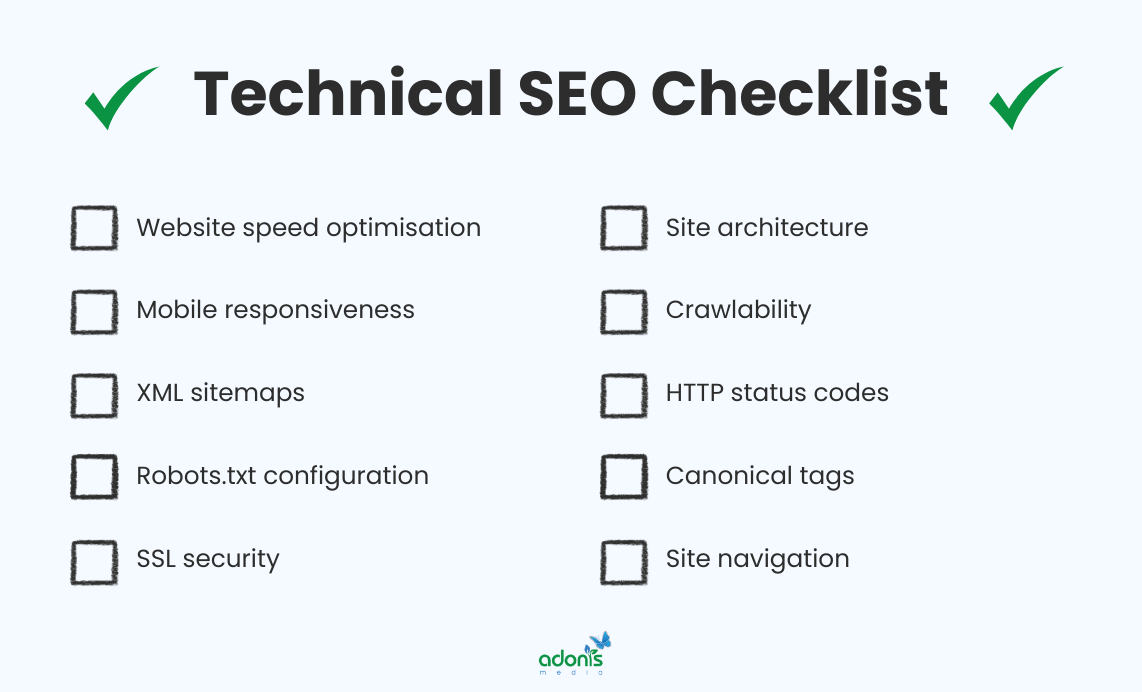
Technical SEO forms the backbone of your website's search performance. It works silently behind the scenes to boost your online presence. Let's explore its benefits and advantages when it is properly implemented.
Impacts Search Rankings
Technical SEO helps search engines understand and evaluate your website's content more effectively, leading to better visibility in search results. By optimising your website's technical elements, you're giving search engines clear signals about your content's relevance and value.
A well-structured technical foundation ensures that your content reaches its full ranking potential, regardless of how well-written or optimised that content might be. When search engines can properly access and interpret your website, they're more likely to rank it favourably.
The #1 result in Google's organic search results has an average click-through rate of 28%, and it's impossible to place your website at the top of the search results without proper technical SEO.
Improves Site Speed
Site speed optimisation is a crucial technical SEO element that directly affects how quickly your web pages load for visitors. By implementing proper speed optimisation techniques, you can significantly reduce loading times and improve website performance.
When your website loads quickly, it creates a seamless browsing experience that keeps visitors engaged with your content. Fast-loading pages are essential for maintaining user interest and preventing premature visitors from leaving your site.
Research shows that when page load time increases from one to three seconds, the probability of a visitor bouncing increases by 32%, demonstrating how crucial technical SEO is for website loading speed.
Enhances User Experience (UX)
Technical SEO is vital in creating a smooth and enjoyable browsing experience for your website visitors. When your website is technically optimised, users can easily navigate through pages, find information quickly, and interact with your content seamlessly.
A well-structured technical foundation ensures your website loads quickly, displays appropriately across all devices, and provides clear navigation paths. These elements work together to keep visitors engaged and reduce bounce rates.
Impacts Indexing and Crawlability
Technical SEO ensures that search engines can effectively discover, crawl, and index your website's content. Without proper technical optimisation, even the highest-quality content might remain invisible to search engines.
Search engines must crawl and analyse your content before indexing it properly. This process is essential because pages must be indexed before appearing in search results and driving organic traffic to your website.
Mobile Optimisation Advantages
A mobile-optimised website displays your content perfectly across all devices, from smartphones to tablets. When your website adapts seamlessly to different screen sizes, it creates a consistent and professional experience for all visitors.
Mobile optimisation goes beyond responsive design. It includes optimising images, improving tap targets, and ensuring text is readable without zooming. These elements work together to keep mobile users engaged and reduce their likelihood of leaving your site.
Statistics show that 30% of smartphone users are more likely to utilise a company's mobile site for browsing or shopping when making purchases, and 50% want to use a mobile site because they don't want to download an app.
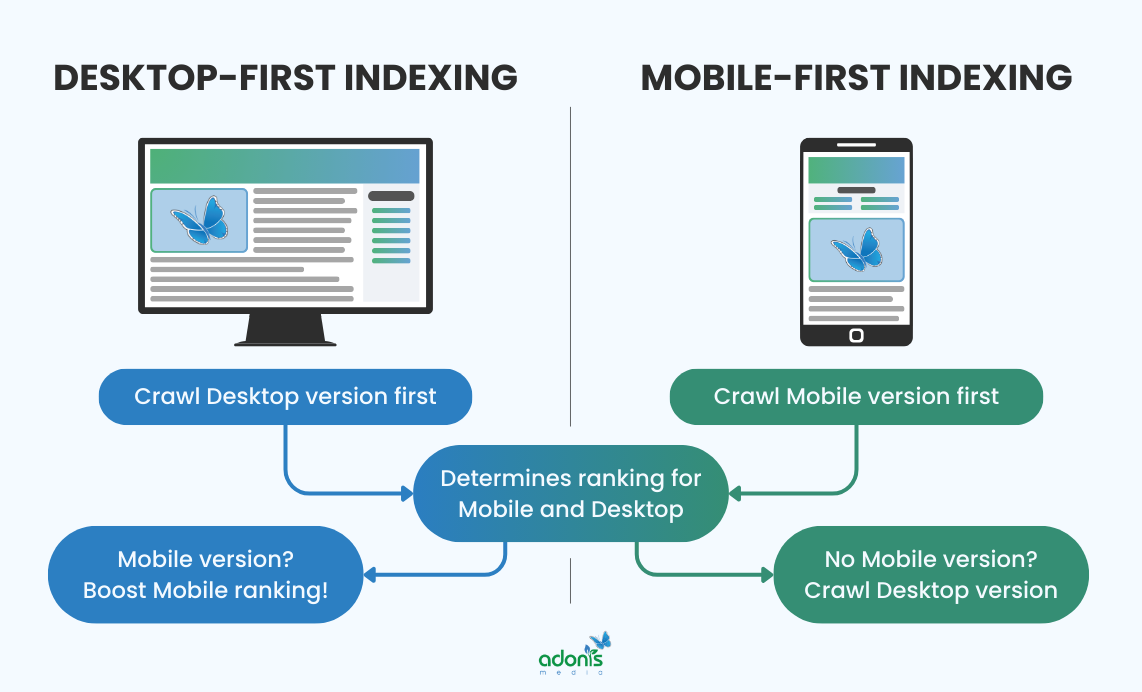
Additionally, Google now does mobile-first indexing. The mobile version of your site's content is crawled with the smartphone agent for indexing and ranking purposes. Although a mobile version of your pages is not mandatory, having one is highly advisable, especially for user needs and preferences.
On-Page vs Off-Page vs Technical SEO
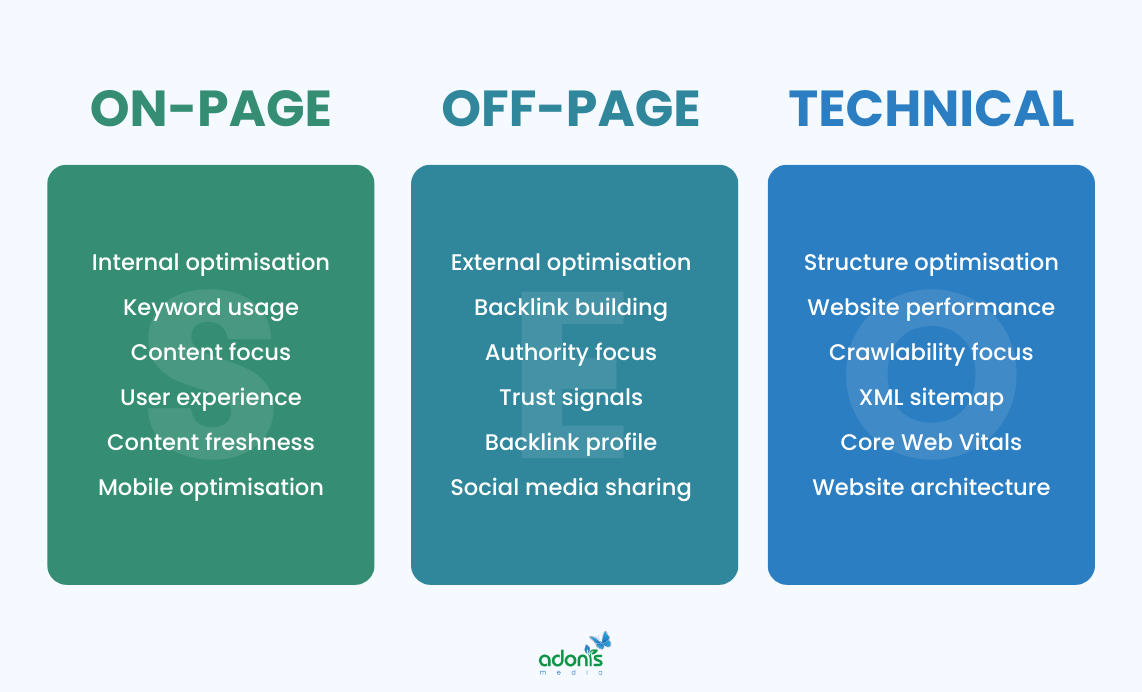
While technical SEO focuses on your website's backend structure, on-page and off-page SEO deal with content optimisation and external factors respectively. Understanding how these three elements work together helps create a comprehensive SEO strategy that drives results.
Key Differences
Technical SEO deals with your website's infrastructure and backend elements.
In contrast, on-page SEO focuses on content optimisation, and off-page SEO handles external signals like backlinks and social mentions. Each type serves a unique purpose in improving your search visibility.
Impact on Search Rankings
Technical SEO influences how search engines discover and interpret your website, while on-page and off-page SEO affect how your content ranks for specific keywords and builds authority.
Understanding these different impacts helps you create a balanced SEO strategy that addresses all aspects of search engine optimisation, leading to better overall performance in search results.
How They Work Together
Technical SEO provides the foundation, while on-page SEO optimises your content, and off-page SEO builds your site's authority. These three elements complement each other to create a strong online presence that search engines can easily understand and rank.
Your website needs all three types of SEO working in harmony to succeed. Even with excellent content and numerous backlinks, poor technical SEO can prevent search engines from properly crawling and indexing your pages.
Which One You Should Focus On First
Start by ensuring your technical SEO is solid before diving into content creation or link building. A strong technical foundation ensures that underlying technical issues won't hinder your future SEO efforts.
Technical SEO should be your first priority if your website has crawling issues, slow loading times, or problems with mobile responsiveness.
If not addressed early, these technical issues can undermine all other SEO efforts.
Once you've established a strong technical foundation, you can focus on creating quality content through on-page SEO, followed by building authority through off-page SEO strategies.
This systematic approach ensures that each type of SEO builds upon the previous one, creating a strong and sustainable search presence.
Understanding Crawling and Its Process
Since we are talking about technical SEO, we cannot skip this part, which is crawling.
Just like spiders weave their webs to catch prey, search engine crawlers navigate through the vast web of internet connections to discover and collect information.
Crawling is the systematic process by which search engines send out automated programs called crawlers to discover, visit, and download web pages across the Internet. These digital explorers help search engines understand and catalogue online content.
When search engines crawl your website effectively, they can better understand, index, and rank your content, making it more visible to potential visitors searching for relevant information.

1. Discovery Phase
Search engines begin their journey with a list of known URLs, called seeds, which they've gathered from previous crawls, sitemaps, or external links.
This initial phase is crucial because it determines which pages get crawled first and how often they'll be revisited. The more important your content is deemed, the higher its priority in the crawling queue.
Search engines discover new URLs through various methods, including crawling previously indexed pages, exploring XML sitemaps, and following internal and external website links.
During this phase, crawlers also check the robots.txt file to understand which parts of the website they're allowed to explore and which areas are off-limits.
As we move forward in the crawling process, these discovered URLs enter the next phase, where crawlers begin fetching their content.
2. Fetching Content
Once crawlers have a list of URLs to explore, they begin downloading the HTML content from each webpage, much like how your browser downloads a page when you visit it.
This stage is vital for search engines as it's their first real look at your content. The speed and efficiency of this process can affect the number and frequency of your pages being crawled.
Crawlers examine the server response codes, checking whether pages are accessible, redirected, or showing errors. This information helps search engines understand your website's health.
If your server responds slowly or returns errors, it can negatively impact how search engines view and process your content, potentially affecting your site's visibility.
3. Parsing and Analysis
During this phase, crawlers break down the fetched HTML content into smaller, understandable pieces, identifying different elements like headings, paragraphs, images, and links.
This detailed analysis helps search engines understand the structure and hierarchy of your content, making it easier to determine what's most important on each page.
Crawlers pay special attention to specific HTML elements like title tags, meta descriptions, headings, and structured data, which provide crucial context for your content.
The information gathered during parsing helps search engines create an accurate map of how your website's content is organised and connected.
4. Rendering Stage
Search engines execute JavaScript and process CSS to understand how your webpage appears to users, similar to how a browser displays content. This stage transforms raw code into the visual elements users see.
The rendering process is crucial because many modern websites rely heavily on JavaScript for content display. Without proper rendering, search engines might miss important content that's dynamically generated.
During rendering, search engines analyse layout, content positioning, and how different elements interact with each other. This helps them understand the complete user experience of your webpage.
Once rendering is complete, search engines move on to examine how your website's pages connect through its link structure.
5. Link Navigation
Crawlers extract all discovered links during the crawling process and add them to their crawling queue, creating a map of your website's structure.
Link navigation helps search engines understand your website's hierarchy and the relationships between different pages. This understanding influences how search engines value and rank your content.
Search engines use these discovered links to determine crawl priority, focusing on pages that appear more important and well-connected within your site's structure.
The more effectively your links are structured, the better search engines can discover and index your content.
Understanding Indexing and Its Process
After crawlers do their job, indexing is the next step.
Think of indexing as a librarian organising books in a massive digital library, ensuring every piece of content can be found quickly when needed.
Indexing is the process where search engines store and organise the information they've gathered during crawling. It's like creating a detailed map of your website's content, making it easily searchable and retrievable.
Proper indexing ensures your content appears in relevant search results, helping users find your website when searching for related topics. Without indexing, your content would be invisible to search engines.
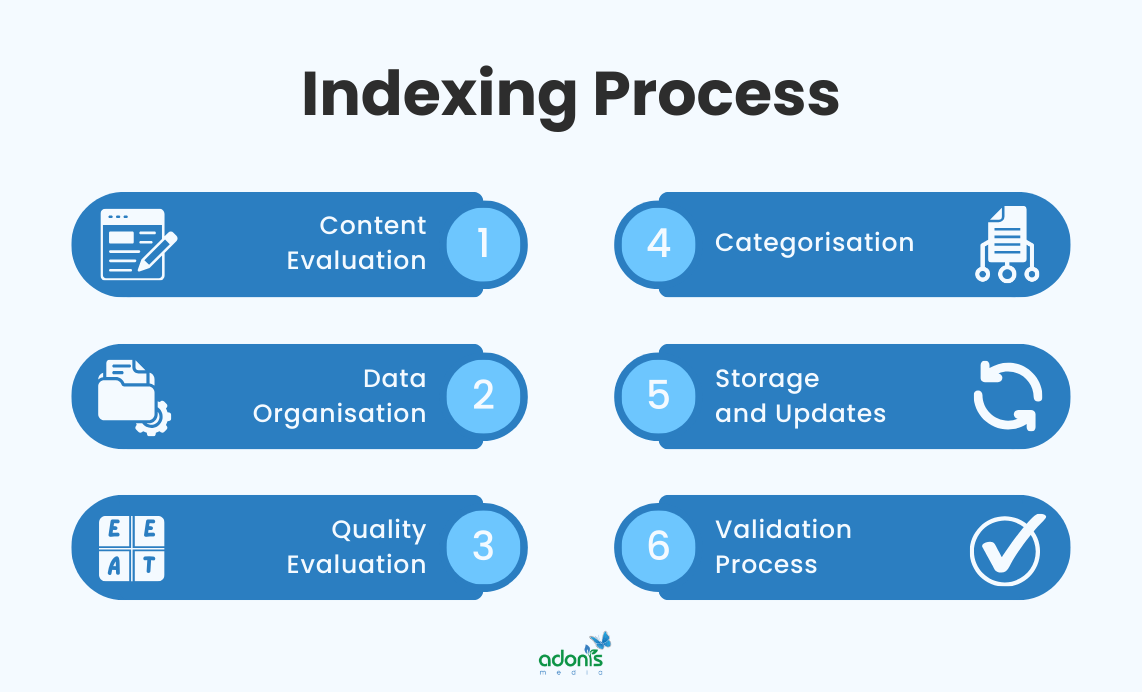
1. Content Evaluation
Search engines carefully analyse your content to understand its topic, purpose, and relevance to potential searches. They examine elements like headings, text content, and media to grasp the full context.
This evaluation stage is crucial because it determines how well search engines understand your content and for which search queries it might be relevant.
During this phase, search engines look for key signals like keyword usage, content structure, and topical relevance to assess how well your content matches user intent.
Search engines also evaluate the uniqueness of your content, checking whether it provides value compared to similar pages already in their index.
2. Data Organisation
Search engines create a structured database of all the content they've evaluated, sorting information into categories and establishing relationships between different pieces of content.
This organisation system is essential because it allows search engines to quickly retrieve relevant content when users perform searches, ensuring fast and accurate results.
The process involves creating detailed records of each webpage, including its content, metadata, and relationships with other pages. This makes it easier to match search queries with relevant results.
3. Quality Evaluation
Search engines assess various factors to determine content quality, including relevance, expertise, authoritativeness, and trustworthiness (E-E-A-T principles). It helps search engines filter out low-quality content and promote pages that provide genuine value to users.
Quality signals include factors like content depth, user engagement metrics, mobile friendliness, and page loading speed, all of which contribute to how well your page serves user needs.
The quality score assigned during this phase significantly influences how your content ranks in search results.
4. Categorisation
Search engines sort and classify your content based on various factors like topics, keywords, and user intent. This process helps them understand where your content fits within their vast database of information.
The categorisation process is vital because it determines which search queries your content will appear for. When done correctly, it ensures your content reaches the right audience searching for relevant information.
Search engines use sophisticated algorithms to analyse content relationships and group similar pages together, making it easier to serve users the most relevant results.
5. Storage and Updates
Search engines maintain a massive database that stores all indexed content, continuously updating it to reflect changes in websites and online information. This ensures that users receive the most current and relevant search results.
Regular updates to the index are crucial because they help search engines track changes to your content, remove deleted pages, and add new ones. This dynamic process keeps search results fresh and accurate.
Search engines use complex systems to manage these updates efficiently, prioritising pages based on factors like site authority, update frequency, and content quality.
6. Validation Process
Search engines perform thorough checks to ensure the quality and authenticity of indexed content before making it available in search results. This validation step helps maintain high standards and prevents low-quality or spam content from appearing in search results.
The validation process involves checking various elements like HTML structure, content quality, and technical implementation. When these elements meet search engine requirements, your content has a better chance of being properly indexed and ranked.
Search engines employ complex algorithms to validate content, checking factors like uniqueness, relevance, and technical correctness. Depending on your website's size and crawl frequency, this process can take several days or weeks.
The final validation ensures your content meets all necessary requirements before being added to the search index. Once validated, your content becomes eligible to appear in relevant search results.
Now that we've covered the complete indexing process, you can better understand how search engines process and store your website's content.
Technical SEO Checklist
You already know what Technical SEO is and how crawling and indexing works. Now, we will walk you through the crucial technical elements you need to optimise, along with practical tips and best practices for implementation.
Site Architecture and URL Structure
These elements form the foundation of your website's technical SEO, making it easier for search engines to crawl and index your pages while providing a better user experience.

Site architecture refers to how your website's pages are organised and linked together, creating a clear path for both users and search engines to navigate through your content.
Keep your site structure as flat as possible, ensuring users can reach any page within three to four clicks from the homepage to maintain link equity and crawlability.
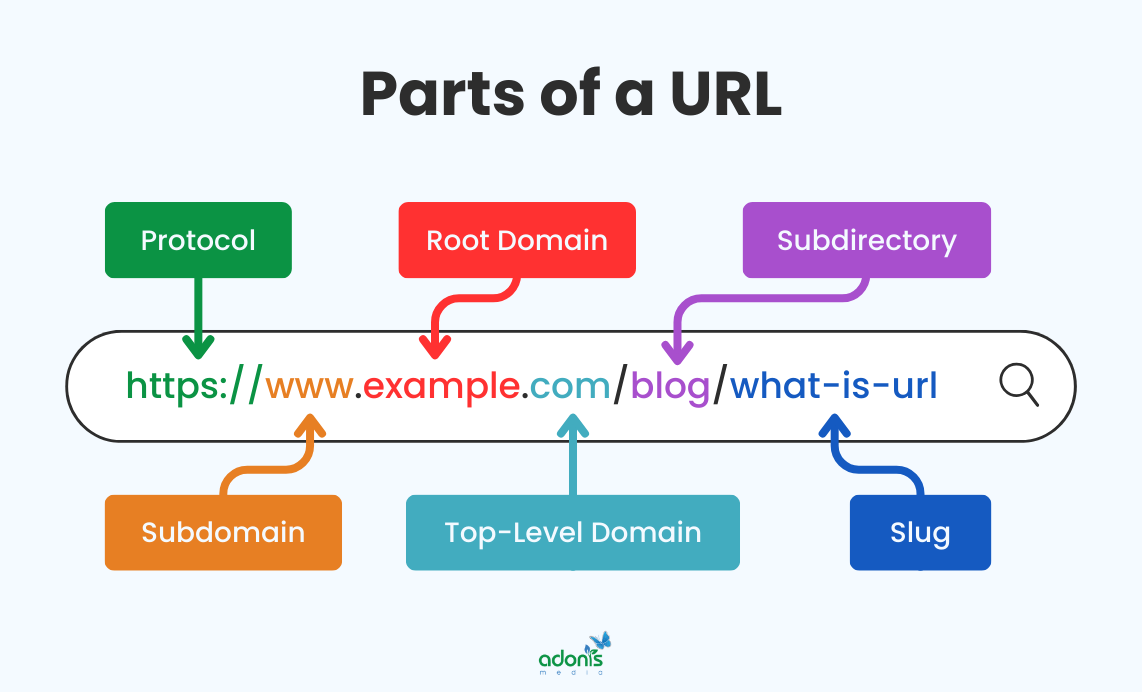
URL structure is the format of your web addresses, which should be clean, descriptive, and easy to understand, helping both users and search engines understand the hierarchy of your content.
Use descriptive keywords in your URLs but keep them short and avoid unnecessary parameters or numbers that might confuse users and search engines.
Additional tips for optimising your site architecture and URL structure:
- Create a logical hierarchy that mirrors your content's natural categories
- Use breadcrumb navigation to help users understand their location
- Implement consistent URL patterns across your website
- Avoid duplicate content by properly handling URL variations
- Use hyphens instead of underscores in URLs for better readability
XML Sitemap and Robots.txt Setup
These two elements work together to help search engines crawl and index your website more effectively, ensuring your important content gets discovered and ranked appropriately. They can help you manage your crawl budget and ensure search engines focus on your most valuable content when properly configured.
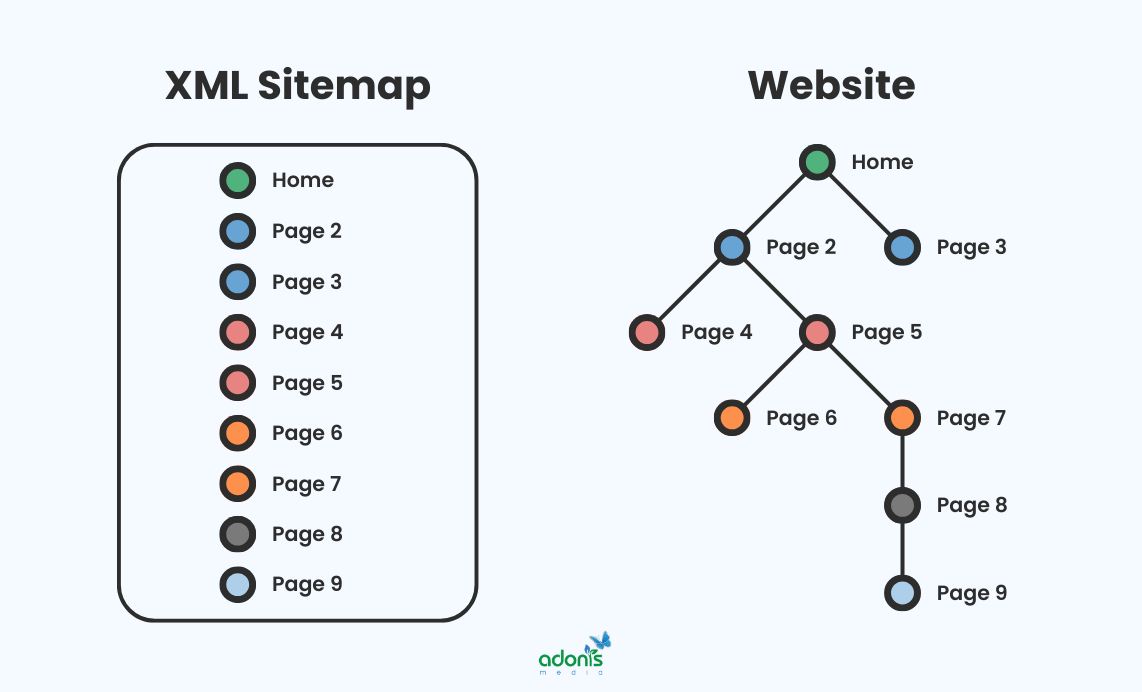
An XML sitemap acts as a roadmap for search engines, listing all your important pages and their relationships. It helps search engines understand your website's structure and find content more efficiently.
Update your XML sitemap automatically whenever you publish new content or make significant changes to your website structure to ensure search engines always have the latest information.
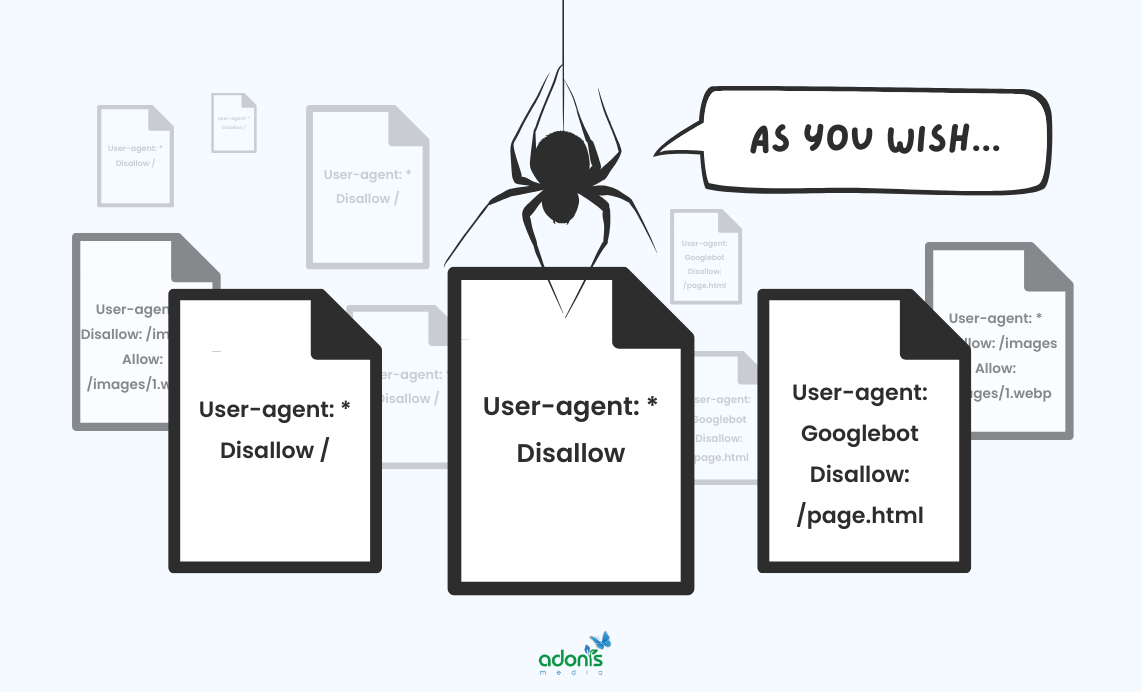
A robots.txt file tells search engines which parts of your website they can access and which parts they should ignore. It's like traffic rules that guide search engine crawlers through your website.
Use your robots.txt file strategically to prevent search engines from wasting time on unimportant pages like admin areas or duplicate content, preserving your crawl budget.
Tips for optimising your XML sitemap and robots.txt:
- Include only canonical URLs in your sitemap to avoid confusion
- Keep your sitemap size under 50,000 URLs and 50MB
- Test your robots.txt file regularly to ensure it's working correctly
- Use sitemap index files if you have multiple sitemaps
- Add image and video sitemaps if your site contains rich media
Mobile Responsiveness
Mobile responsiveness ensures your website adapts smoothly to different screen sizes and devices, providing an optimal viewing experience whether someone visits from a phone, tablet, or desktop computer.
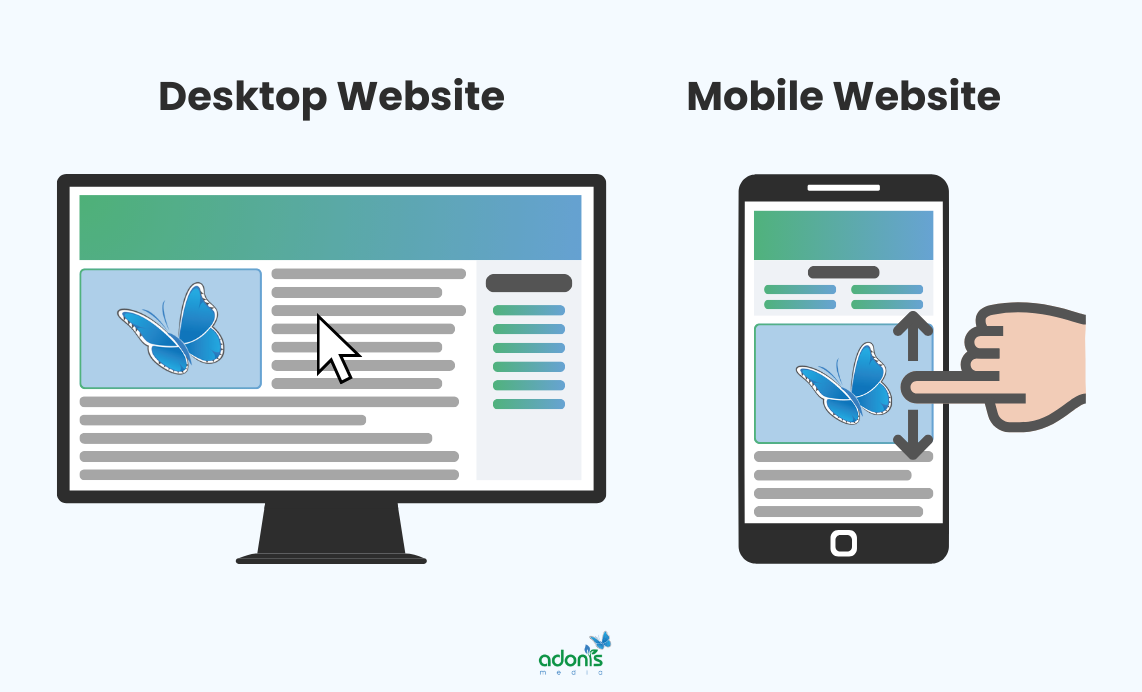
With most web traffic now coming from mobile devices, having a mobile-responsive website is crucial for maintaining good search rankings and keeping visitors engaged with your content.
Rather than creating separate mobile and desktop versions of your website, use a fluid grid system that automatically adjusts your content layout based on screen size.
Additional tips for optimising mobile responsiveness:
- Ensure text is readable without zooming
- Make buttons and links large enough for easy tapping
- Avoid using Flash or other mobile-incompatible technologies
- Optimise images for different screen sizes
- Keep forms simple and easy to complete on mobile devices
- Test your site across multiple devices and browsers
SSL Certificate and Security Protocols
An SSL certificate creates a secure connection between your website and its visitors, encrypting data to protect sensitive information like passwords and payment details.
Security protocols are sets of rules and procedures that help protect your website from various cyber threats, ensuring both your site and your visitors' data remain safe.
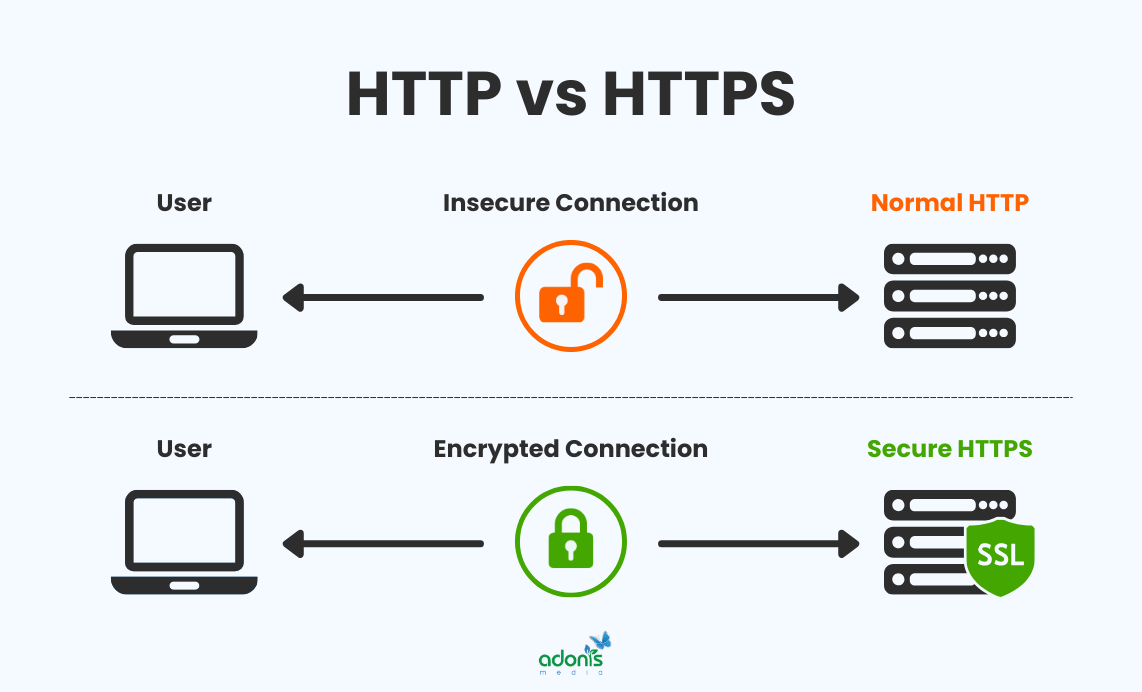
Having proper security measures in place builds trust with both users and search engines, potentially improving your search rankings and conversion rates. Search engines prioritise secure websites in their rankings, making SSL certificates and security protocols essential for good technical SEO.
Choose the right type of SSL certificate for your needs. A simple domain validation certificate works for most websites, while e-commerce sites should consider extended validation certificates. Regularly update your security protocols and conduct security audits to identify and fix potential vulnerabilities before they become problems.
Additional security measures to implement:
- Enable HTTP Strict Transport Security (HSTS)
- Implement regular malware scanning
- Use strong password policies
- Set up regular backup systems
- Keep all software and plugins updated
- Monitor your website's security logs regularly
Schema Markup Implementation
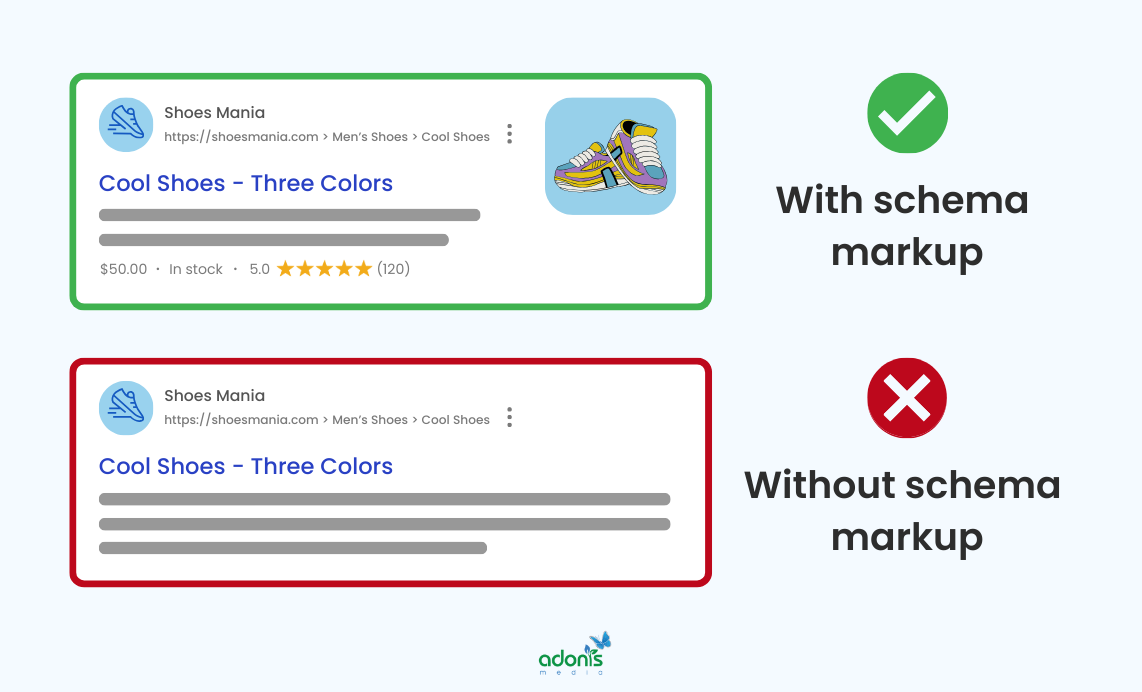
Schema markup is a code vocabulary that helps search engines understand the context and meaning of your content better. It's like adding labels to your content that clearly identify what different elements represent.
These structured data snippets help search engines display rich results in search listings, making your content more visible and attractive to potential visitors.
Adding schema markup to your website can improve how search engines interpret your content and potentially enhance your visibility in search results. When implemented correctly, schema markup can improve click-through rates by displaying enhanced search results with additional information like ratings, prices, or event dates.
While Schema.org houses nearly 800 different types of schema markup, Google actively supports about 35 types for rich search results.
Popular schema markup types:
- Article Schema: Helps search engines identify news articles and blog posts, making them eligible for Top Stories features
- Organisation Schema: Displays company details, including name, logo, contact information, and social media
- Local Business Schema: Perfect for brick-and-mortar shops, showing address, opening hours, contact details, and customer ratings
- Product Schema: Shows essential product information like price, availability, ratings, and reviews directly in search results
- FAQ Schema: Displays frequently asked questions and answers in search results, though now limited to authoritative websites
- Person Schema: Provides information about individuals, including name, job title, and contact details
- Review Schema: Shows star ratings and customer reviews, particularly valuable for businesses and products
- Event Schema: Displays information about upcoming events, including dates, locations, and ticket availability
- Recipe Schema: Shows cooking time, nutrition information, and ratings for food-related content
- Website Schema: Helps establish the relationship between your homepage and organisation, particularly useful for search functionality
- Breadcrumb Schema: Shows the page's position in your website's hierarchy, helping users understand navigation
- Video Schema: Provides additional information about video content, helping it appear in video search results
Start with your content's most relevant schema types, such as Organisation, Local Business, or Product markup, rather than trying to implement every possible schema type at once.
Use Google's Rich Results Test tool regularly to verify your schema implementation and ensure it's working correctly for your target search features.
Steps to implement schema markup effectively:
- Identify the most appropriate schema types for your content
- Choose your preferred format (JSON-LD, Microdata, or RDFa)
- Add the markup to your website's HTML
- Test the implementation using schema validation tools
- Monitor rich result performance in the Search Console
- Update schema markup when content changes
- Regular testing and validation of markup implementation
Advanced Technical SEO Techniques
As your website grows and evolves, basic technical SEO might not be enough to maintain a competitive edge in search rankings. Advanced technical SEO techniques help you optimise your website beyond the basics, addressing complex challenges that can significantly impact your search performance.
JavaScript SEO Optimisation
JavaScript SEO optimisation ensures that search engines can properly crawl, render, and index content generated or modified by JavaScript code on your website.
Implementing JavaScript SEO is crucial because modern websites increasingly rely on JavaScript for dynamic content and interactive features, which can pose challenges for search engine crawlers.
When JavaScript isn't properly optimised, search engines might miss important content or struggle to understand your website's structure, potentially affecting your rankings.
JavaScript optimisation can improve page load times and user experience while ensuring search engines can access all your content effectively.
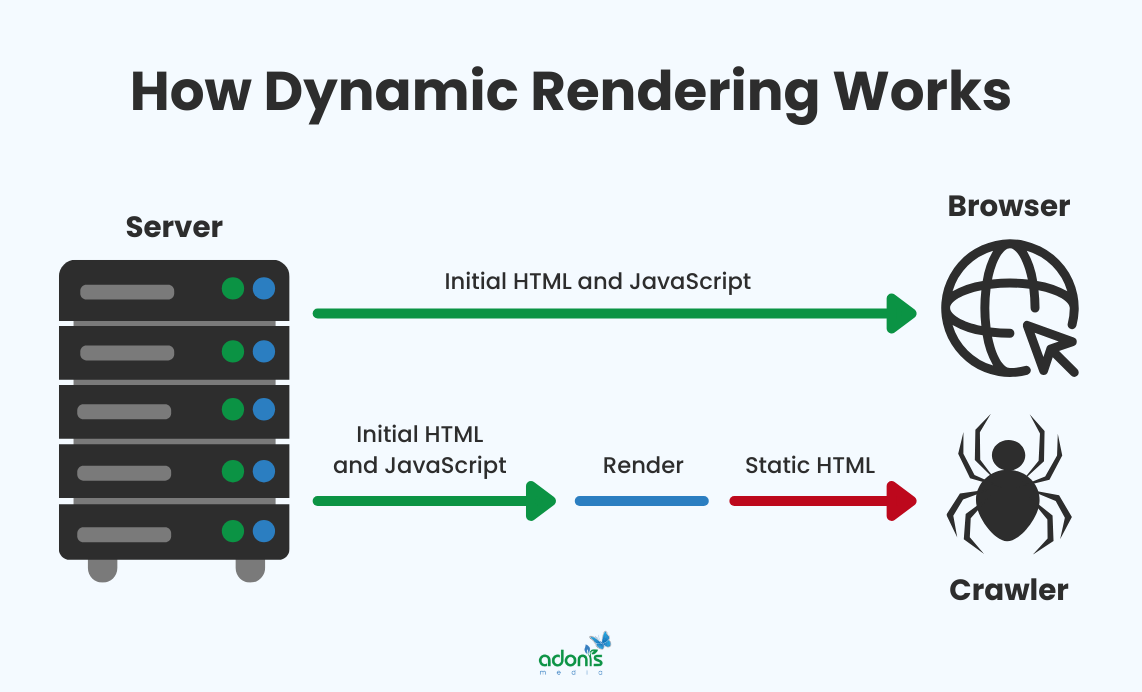
Use server-side rendering for critical content whenever possible, as it ensures search engines can access your content immediately without waiting for JavaScript execution. Implement dynamic rendering for complex JavaScript applications, serving pre-rendered HTML versions to search engines while maintaining interactive features for users.
Best practices for JavaScript SEO optimisation:
- Avoid blocking JavaScript files in robots.txt
- Minimise reliance on JavaScript for critical content
- Use progressive enhancement techniques
- Implement proper error handling
- Monitor JavaScript errors in the Search Console
- Use async or defer attributes appropriately
- Ensure critical content loads first
International SEO Setup
International SEO involves optimising your website to target users in different countries or speaking different languages, ensuring your content reaches and resonates with global audiences.
When expanding your business globally or targeting specific regions, you should implement international SEO, which helps you compete effectively in different markets.
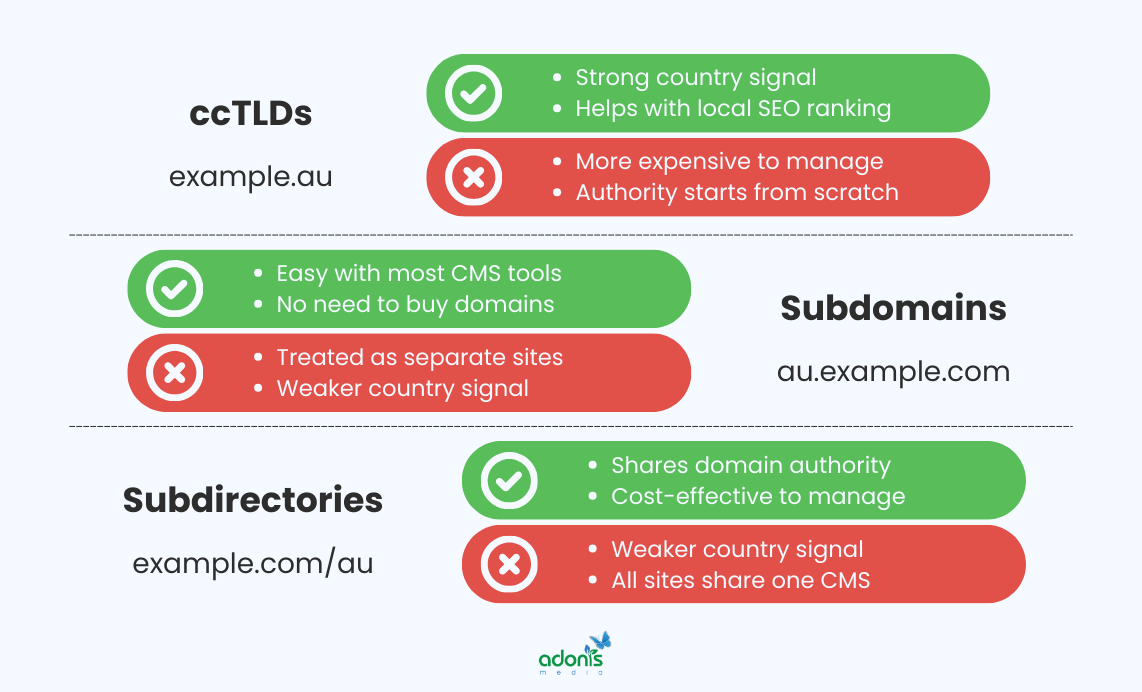
Domains are your great asset for international SEO setup. Choose between country-specific domains, subdomains, or subdirectories based on your business needs and resources for maintaining multiple versions.
Best practices for international SEO:
- Implement proper hreflang tag structure
- Use appropriate URL structures for different markets
- Create unique, localised content for each target region
- Configure geotargeting in the Search Console
- Use local servers or CDNs for better performance
- Implement local currency and date formats
- Ensure proper language detection
- Consider cultural differences in design and content
Progressive Web Apps (PWA)
Progressive Web Apps combine the best features of websites and mobile applications, offering users an app-like experience through their web browsers without requiring installation.
PWAs can significantly improve user engagement and retention by providing faster load times, offline functionality, and a more seamless mobile experience.
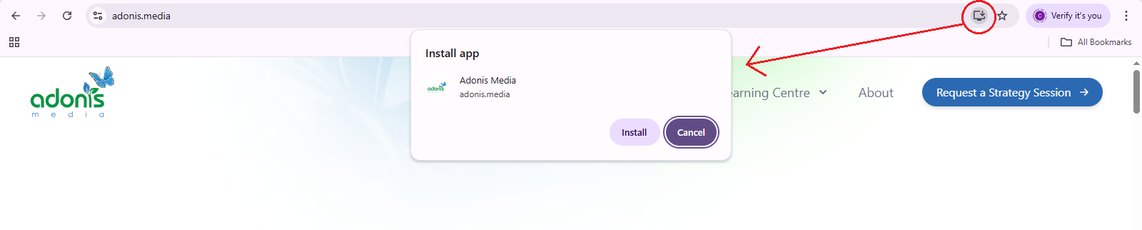
To determine if a desktop website has activated PWA, open Chrome, and you will see an "Install" or "Add to Home Screen" prompt in the address bar or browser menu.
When clicked, it will tell you to install the website itself to have an app-like experience.
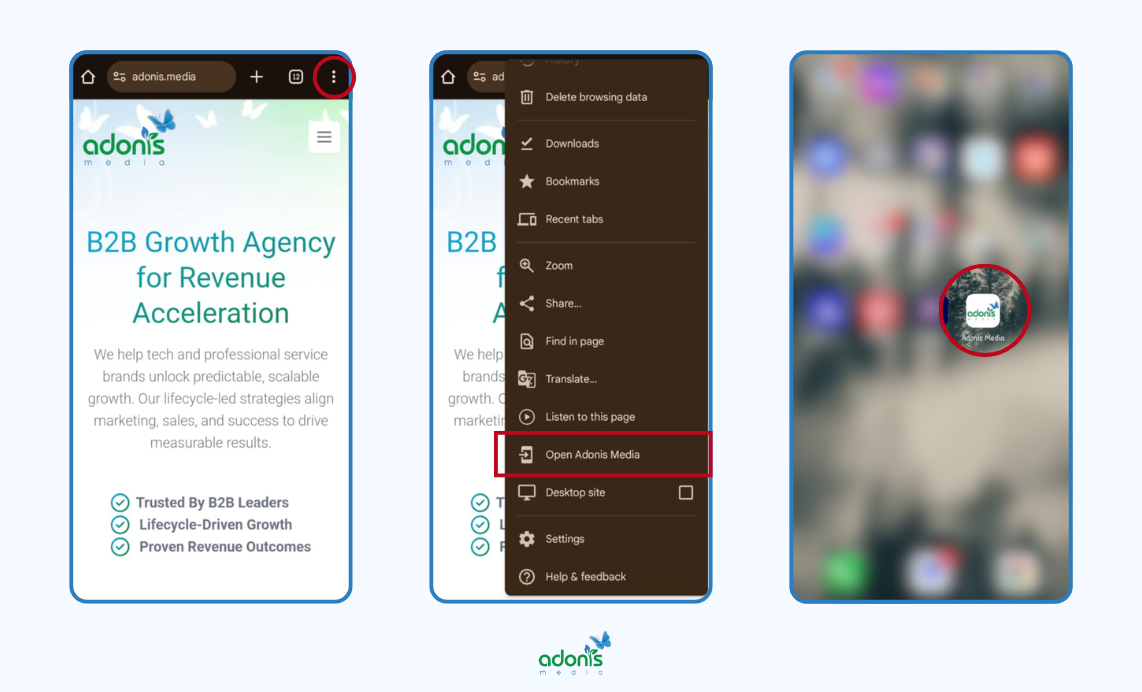
On mobile, specifically on Android devices, tap the three dots menu on your Chrome at the top right corner of the screen.
If you see "Open [Brand Name]," the site supports PWA installability
Another way to check if a website has an activated PWA is to open the website in Chrome once more.
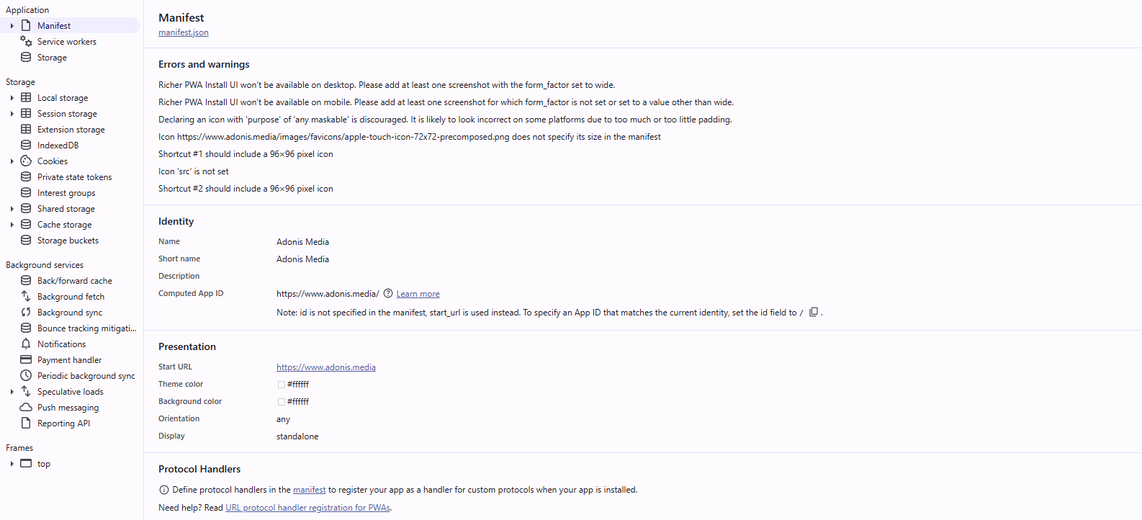
At the top right corner of the screen, click the three dots menu > More Tools > Developer Tools. You can also use Ctrl+Shift+I on your keyboard to open the Developer Tools.
Go to the "Application" tab, look for a "Manifest" section, and check if there's a valid web app manifest (it's a JSON file with app details).
Under "Service Workers," see if a service worker is registered and active.
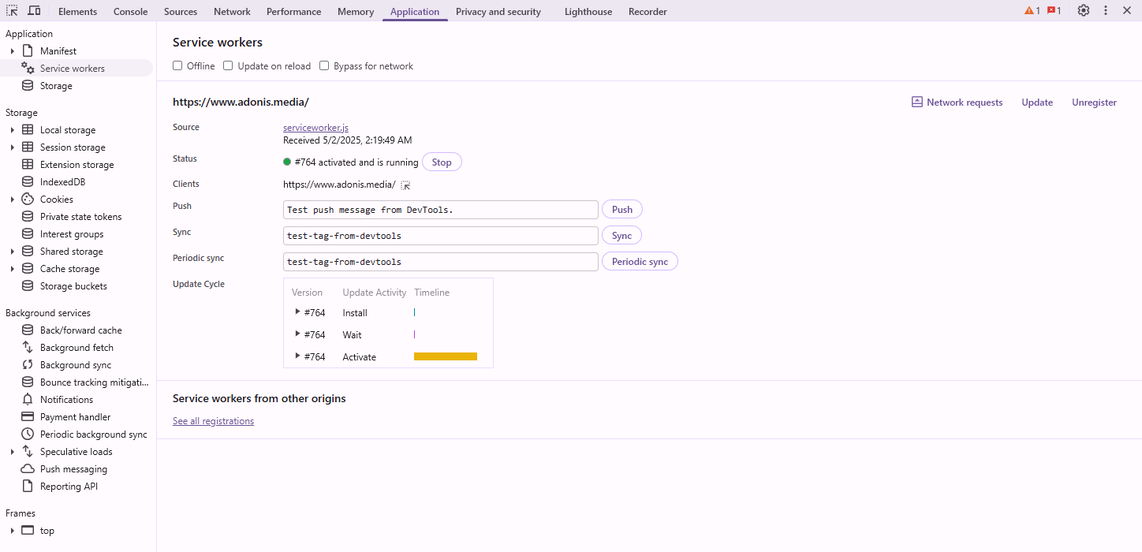
If both are present and working like in the picture, it's likely a PWA.
Search engines favour PWAs because they offer superior user experience and performance metrics, potentially leading to better rankings and increased mobile traffic. It can also reduce bounce rates and increase time on site by providing instant loading and reliable performance, even in poor network conditions.
Start with a PWA-lite approach by implementing basic features like service workers and a manifest file before moving to more complex functionality. Use Lighthouse audits regularly to measure your PWA's performance and identify areas for improvement in accessibility, performance, and best practices.
Best practices for PWA implementation:
- Create a comprehensive service worker strategy
- Implement an app manifest file correctly
- Ensure offline functionality works smoothly
- Optimise for fast first load and subsequent visits
- Use responsive design principles
- Implement push notifications thoughtfully
- Enable app-like navigation
- Test across different devices and browsers
Core Web Vitals Optimisation
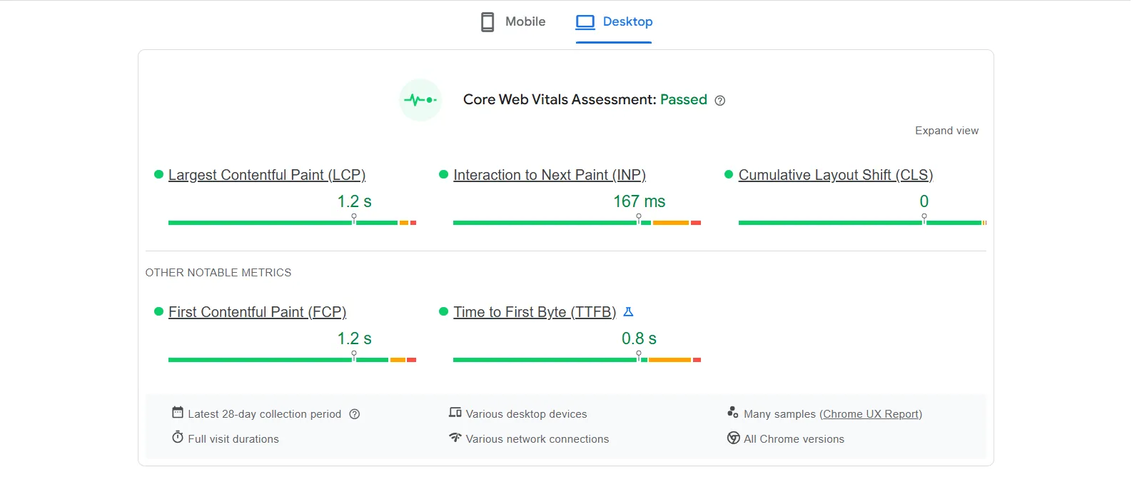
Core Web Vitals are essential metrics that measure your website's loading performance, interactivity, and visual stability. They directly impact how search engines evaluate your site's user experience.
These metrics are crucial for maintaining good search rankings because Google uses them as ranking signals to determine which websites provide the best user experience.
Here's an example of a result of the Core Web Vitals Assessment for desktop:
And this one is for mobile:
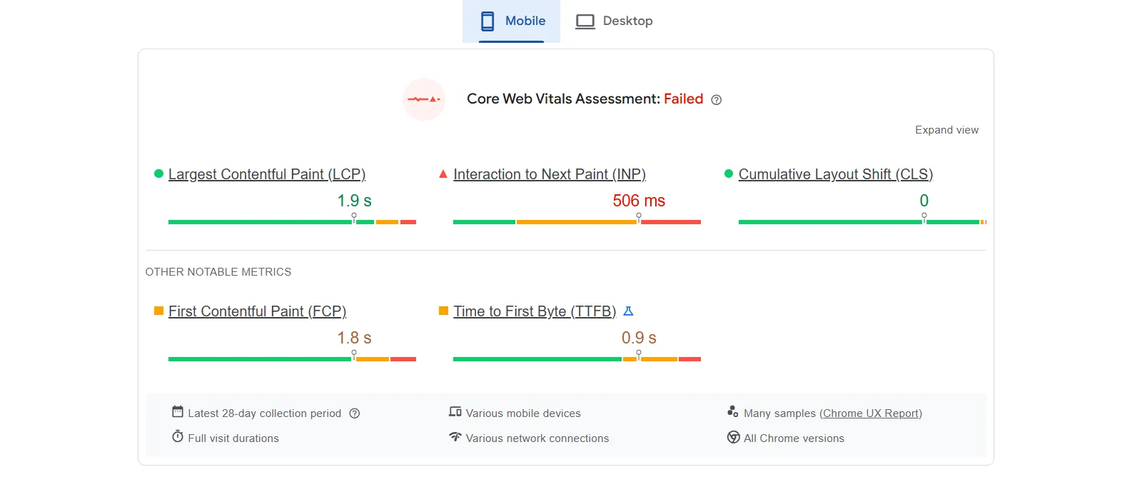
When properly optimised, Core Web Vitals can significantly improve user engagement, reduce bounce rates, and increase the likelihood of conversions on your website.
Better Core Web Vitals scores can give you a competitive advantage, as many websites still struggle to meet Google's recommended thresholds.
Understanding and improving these metrics helps create a better foundation for your overall technical SEO strategy.
Focus on optimising your Largest Contentful Paint (LCP) first, as it typically has the most significant impact on user perception and is often the easiest to improve through image optimisation and server response times.
Use lazy loading for images below the fold and implement proper image sizing to improve both LCP and Cumulative Layout Shift (CLS) scores simultaneously.
Best practices for Core Web Vitals optimisation:
- Compress and optimise all images before uploading
- Minimise main thread work by reducing JavaScript execution time
- Implement proper caching strategies
- Use a Content Delivery Network (CDN)
- Remove unused code and minimise dependencies
- Optimise server response times
- Implement resource prioritisation
- Monitor performance regularly using Google Search Console
HTTP Header Optimisation
HTTP headers are special instructions that control how browsers and search engines interact with your website's content, affecting everything from security to caching behaviour.
Proper HTTP header configuration helps improve website security, performance, and how search engines crawl and index your content, ultimately affecting your search rankings.
To check your website's HTTP headers, open it in Chrome and open the Developer Tools by pressing Ctrl+Shift+I on your keyboard or clicking the three-dot menu at the top right corner of the screen > More Tools > Developer Tools.
You can also right-click anywhere on the page and select "Inspect".
Go to the "Network" tab and reload the page (press F5 or click the refresh button).
Click on your website's name (or any file listed) under the "Name" column and select the "Headers" tab in the right pane.
You'll see the HTTP headers, usually separated into "Response Headers" and "Request Headers".
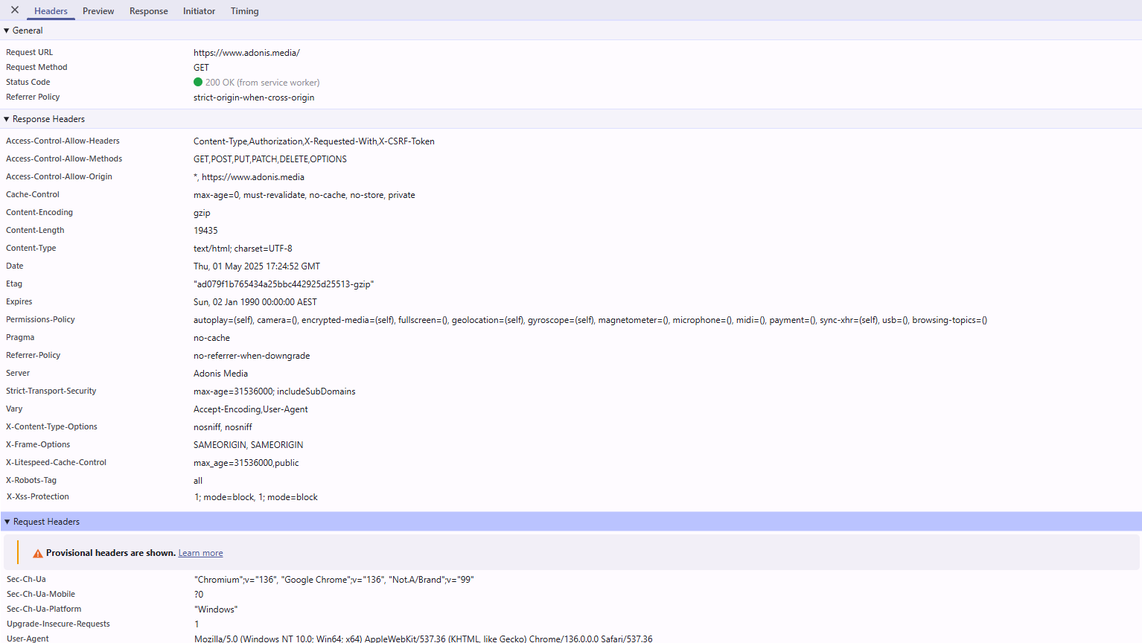
HTTP headers are crucial in managing browser caching, content security, and resource delivery, directly impacting Core Web Vitals scores.
Use the Cache-Control header strategically to help browsers store static resources locally, reducing server load and improving page load times for returning visitors. Implement HSTS (HTTP Strict Transport Security) headers to force secure HTTPS connections, enhancing both security and user trust signals.
Essential HTTP header optimisation practices:
- Configure proper caching headers for static resources
- Implement security headers like Content-Security-Policy
- Use correct content-type headers for all resources
- Set up compression headers for faster content delivery
- Enable CORS headers when necessary
- Monitor and update headers regularly
- Test header configuration with security tools
- Validate header implementation across different browsers
Further Learning
Looking to learn more? I've collected some fantastic resources that go hand-in-hand with this topic if you want to dive deeper.
- schema.org — Schema.org Official Website
- browserstack.com — How fast should a Website Load in 2024?
- thinkwithgoogle.com — How to think about improving mobile site speed
- developers.google.com — Mobile site and mobile-first indexing best practices
- developers.google.com — Understand the JavaScript SEO basics
- developers.google.com — Understanding Core Web Vitals and Google search results
- learn.microsoft.com — Overview of Progressive Web Apps (PWAs)
- moz.com — International SEO Best Practices
- digicert.com — What is SSL, TLS and HTTPS?
- reddit.com — Reddit r/SEO Thread: "How important is technical SEO in 2024, and what are the key areas to focus on to ensure that the site is technically optimized?"
Taking Your Technical SEO to the Next Level
Technical SEO works silently behind the scenes to boost your online visibility. From proper site architecture and mobile responsiveness to advanced techniques like Core Web Vitals optimisation, each element is vital in helping search engines understand and rank your content.
By implementing these technical SEO elements correctly, you're not just making your website more search-engine friendly but creating a better, faster, and more secure experience for your visitors.
Need help implementing these technical SEO strategies? Our team can help audit your website and create a customised technical SEO plan. Book a free consultation today to discover how we can improve your website's search performance.
Got a question in mind? Check out the FAQs below for quick answers!
